Talk to us
Prokyonz
OneINV OneINV: one application, three modules

Record the proof.
Sync the stock.
Process the order.

VMS films every pack and every return. Inventory Sync keeps stock correct everywhere. Order Processing turns a pile of pending orders into printed, courier-sorted labels in one pass. One installation, switch on whichever modules you need.

Forward + return video Stock synced everywhere SKU labels, split & sorted

One trial length across every module now — 7 days, full access, no card required

What OneINV is for, in one picture

One app, covering the order from stock to proof

Three modules, each answering a different moment in a seller's day. Every one of them also runs completely on its own — you don't need the whole chain to get value from one link of it.

1 · Before the saleInventory Sync keeps stock correct on every marketplace
2 · At the orderOrder Processing splits, labels and sorts it by courier
3 · At the pack tableVMS films the pack, the dispatch, and any return
4 · If a claim landsProof is already filed against the Tracking ID
Three modules, one seller base each

Every module, visible up front

OneINV serves different sellers for different reasons, so all three stay on screen with what they do, what they cost and their trial — nothing is tucked behind a click a visitor never makes. Open one to see the full walkthrough.

  • SKU-wise label printing & order splitting
  • Courier-wise sorting, one-click summary
  • One rate across every platform

Full walkthrough, features & supported platforms

Stop processing orders one browser tab at a time

Bulk order days mean logging into every marketplace panel, printing labels one by one, and working out by hand which parcel goes to which courier. It doesn't scale past a few dozen orders.

Order Processing downloads every pending order across your connected platforms, splits multi-item orders into separate shippable pieces, prints SKU-wise labels, and groups the batch by courier — then hands you one summary of what just happened.

Illustrative view of the processing screen

Bulk order processing

Process dozens or thousands of pending orders together instead of one browser tab at a time.

SKU-wise label printing

Labels print grouped and sorted by SKU, so a packer can pick, match and pack without hunting through a mixed stack.

Split multi-item orders

An order with several SKUs is split into its separate shippable pieces automatically, each with its own correct label.

Courier-wise distinguishing

The processed batch is grouped by assigned courier, so handover at pickup is a sorted stack, not a search.

One-click order summary

Every run ends with a single summary: orders in, shipments out, split count and per-courier counts.

One rate, every platform

A single per-order rate applies whichever marketplace the order came from — no separate plan per platform to track.

Supported platforms

Live today on Amazon, Myntra and Flipkart. Ajio, Meesho and Nykaa are integrating next, at no extra cost once they land.

Amazon order processing

Amazon

Live
Myntra order processing

Myntra

Live
Flipkart order processing

Flipkart

Live
Ajio order processing

Ajio

Integrating
Meesho order processing

Meesho

Integrating
Nykaa order processing

Nykaa

Integrating

How a batch run works

Four steps, one sitting, whatever the batch size

1

Pull pending orders

Download every pending order across your connected, live platforms into one queue.

2

Split & label

Multi-item orders split into shippable pieces; labels print SKU-wise.

3

Sort by courier

The processed batch groups itself by assigned courier for handover.

Get the summary

One screen: orders processed, shipments created, split count, courier breakdown.

  • Orders pulled automatically, stock pushed back everywhere
  • Low stock alerts, audit trail, exportable reports
  • One primary sync machine, read-only for the team

Full walkthrough, features & steps

Sell the same SKU in seven places without overselling it

List one product across Amazon, Flipkart, Myntra, Meesho, Ajio, Snapdeal and Shopify, and every sale has to be deducted everywhere before somebody buys stock you no longer hold.

Inventory Sync does that deduction once and republishes the corrected number to every connected channel, so no marketplace is left holding a quantity you cannot fulfil.

Illustrative view of the inventory screen

Real-time stock tracking

Monitor live inventory levels across all your e-commerce channels from a single dashboard.

Multi-platform sync

Stock stays aligned across all seven connected marketplaces — Amazon, Flipkart, Myntra, Meesho, Ajio, Snapdeal and Shopify — with no manual updates needed.

Low stock alerts

Get alerted before you run out, so you never oversell or lose a sale to a stock gap.

Insightful dashboard

KPI cards, stock summaries and order trends keep everything visible at a glance.

Audit reports

Complete audit trail for every stock movement, covering stock in, stock out and adjustments, with Excel and PDF export.

Order management

Track and manage open orders across platforms, all from within a single interface.

Supported platforms

OneINV syncs inventory across seven of India's leading marketplaces

Amazon inventory sync

Amazon

India's largest marketplace

Flipkart inventory sync

Flipkart

Fashion, electronics & more

Myntra inventory sync

Myntra

Fashion, lifestyle & beauty

Meesho inventory sync

Meesho

Social commerce & reselling

Ajio inventory sync

Ajio

Fashion & lifestyle

Snapdeal inventory sync

Snapdeal

Value & budget shoppers

Shopify inventory sync

Shopify

Your own branded storefront

Your first 7 days

Guided onboarding with no pressure and no technical hassle

1

Submit request

Fill the contact form or WhatsApp us with your business details.

2

We call within 24 hrs

Our team understands your platform setup and order volumes.

3

Guided setup

We connect your seller accounts, map SKUs and set your stock baseline with you.

7-day free trial

Full access with hands-on support from our team, and no commitment.

  • Forward and return video, same Tracking ID
  • Any USB webcam, several stations in parallel
  • Search & download by Tracking ID

Full walkthrough, features & steps

The claim says “empty box”. You have the video.

A buyer returns an empty carton, a used item, or something else entirely, then files a claim. With nothing to show, the marketplace decides against you and the loss is yours.

VMS films the packing of every order and the opening of every return, files both against the Tracking ID with the product image, and hands them back to you in seconds.

Illustrative view of the recordings screen

Forward packing video

Every outgoing order gets its own clip, captured as your team packs: product shown, boxed, sealed and labelled.

Return video capture

Record the returned parcel being opened too. Forward and return sit against the same Tracking ID, so the full chain is on record.

Parallel multi-system recording

Run as many packing stations as you need. Every system records at the same time and everything lands in one searchable set.

Product image capture

A still of the actual product packed is saved next to the video. It is the fastest way to defeat a “wrong item received” claim.

Search by Tracking ID

Paste the Tracking ID or AWB from the marketplace dispute. The matching video and product image come up straight away.

Evidence you can submit

Download the clip and the image and attach them to your marketplace claim as proof, whether that is Amazon, Flipkart, Myntra, Meesho, Ajio or another channel.

Genuinely easy to use

Download, install, connect a webcam, record. No integration project, no training programme, no consultant.

No costly hardware

An ordinary USB webcam or the camera already at your packing table is enough. No warehouse rewiring, no CCTV project.

Auto claim filingSOON

Raising the claim straight from OneINV with the video already attached is on the roadmap. It has not been released yet.

The whole chain on record

Most tools stop at dispatch. VMS records the return too, and files it against the same Tracking ID.

1 · Scan & packForward video starts on scan
2 · DispatchClip filed to the Tracking ID
3 · Return raisedParcel comes back to you
4 · Open on cameraReturn video, same Tracking ID
5 · DisputeBoth clips ready to submit

Every packing table records at once

You don't queue orders through one camera. Each station runs its own copy and records in parallel: four packers, four cameras, four simultaneous recordings.

Everything lands in the same searchable set, keyed by Tracking ID, so it doesn't matter which table packed the order when the claim arrives.

REC
Station 1Packing
REC
Station 2Packing
REC
Station 3Packing
REC
Returns deskReverse

How video proof works

Three steps at the packing table, with no extra clicks and nothing new to learn

1

Scan the label

Scan the shipping label at the packing table. OneINV picks up the Tracking ID and starts recording.

2

Pack on camera

Show the product, box it, seal it, label it. The sequence and the product image are captured. Returns are recorded the same way.

Retrieve on demand

Claim lands? Search the Tracking ID, download the video and image, submit them as proof.

Side by side

Which module do you need?

All three modules live inside the same OneINV application. Most sellers eventually run more than one, but none depends on another.

  Order Processing Inventory Sync VMS
SolvesSlow manual processing at bulk-order volumeOverselling, stale stock counts, manual updates on every platformFalse return claims, wrong-item and empty-box disputes
Free trial7 days, starting on install7 days, starting after guided setup7 days, starting on install
How you startDownload the setup and run it. No call needed.Book a call. Our team connects your seller accounts and maps SKUs with you.Download the setup and run it. No call needed.
What you needA Windows PC and access to your marketplace seller accountsA Windows PC and access to your marketplace seller accountsA Windows PC at the packing table and a USB webcam
Platforms today+ Ajio, Meesho, Nykaa integratingAny marketplace you dispatch on
Billing1 order credit, one rate for every platform, from ₹0.08*1 order credit per order processed, from ₹0.15*1 recording credit per video, from ₹0.35*
Can run on its own?YesYesYes

Swipe the table sideways to see all three columns

*Lowest rate, on the largest recharge plan. Rate depends on which plan you choose — see pricing for the full tier list.

The application

One clean desktop app

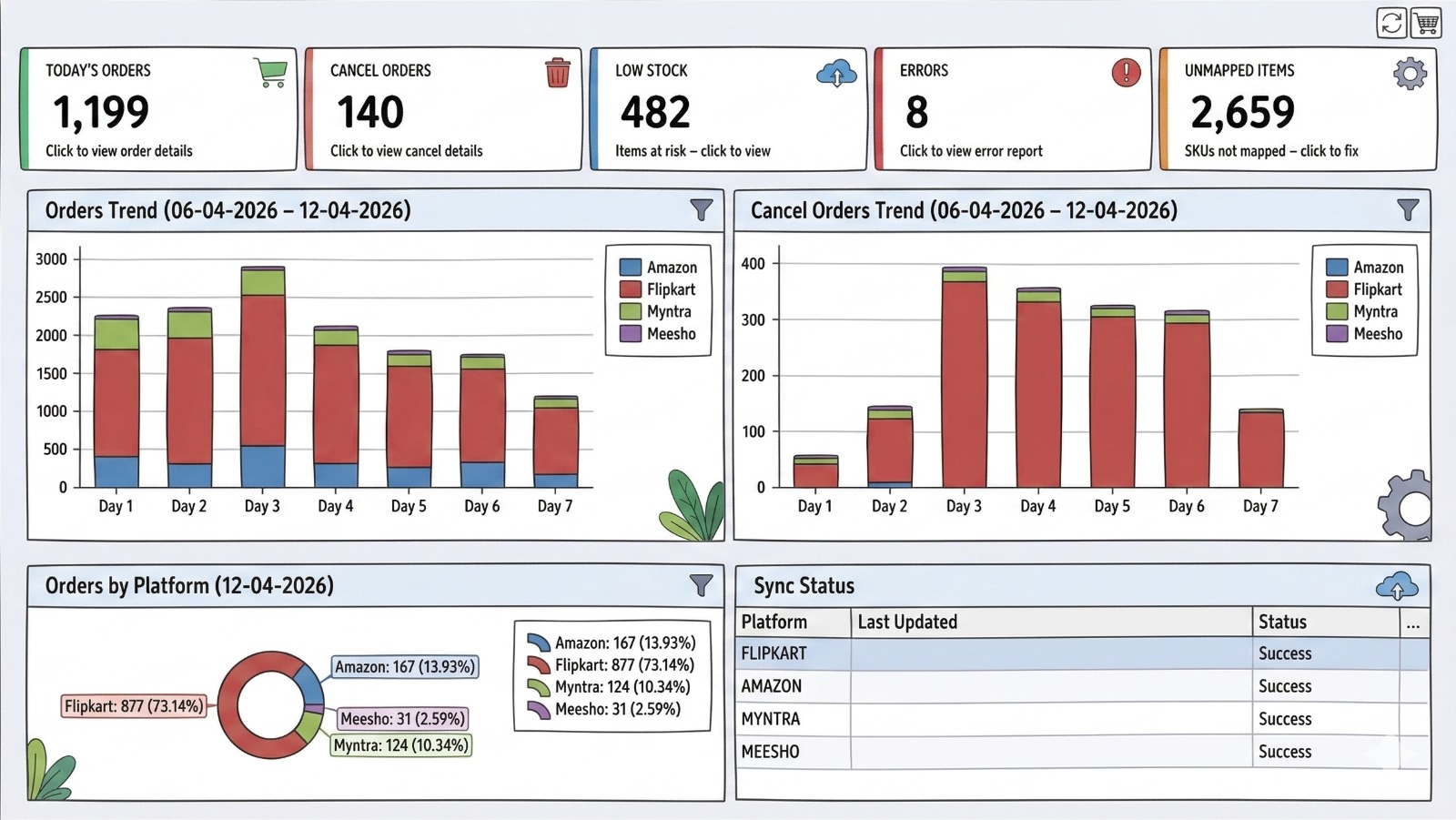
Both modules, your stock and your orders live in the same interface

OneINV Dashboard
OneINV dashboard showing stock levels, order trends and platform sync status
Pricing

Simple, prepaid pricing — all three, on one screen

Each module keeps its own recharge plan and its own buyer. No monthly subscription on any of them: buy credits, use them, top up when you need to.

*Lowest rate, on the largest plan. Open a module below for the full tier-by-tier breakdown.

All 6 tiers

Starter
₹2,500
+ 18% GST · ₹2,950 total
10,000 orders
₹0.25 per order
OOP-STR
Basic
₹5,000
+ 18% GST · ₹5,900 total
25,000 orders
₹0.20 per order
OOP-BAS
Growth
₹9,000
+ 18% GST · ₹10,620 total
50,000 orders
₹0.18 per order
OOP-GRW
Business
₹24,000
+ 18% GST · ₹28,320 total
2,00,000 orders
₹0.12 per order
OOP-BUS
Enterprise
₹40,000
+ 18% GST · ₹47,200 total
5,00,000 orders
₹0.08 per order
OOP-ENT

Order Processing prices are exclusive of 18% GST. Credits are held separately from VMS and Inventory Sync, so this module runs on its own. Not sure which plan fits? Contact us and we will recommend one based on your monthly orders.

All 6 tiers

Starter
₹6,250
 
25,000 orders
₹0.25 per order · Email + remote support
Basic
₹11,500
 
50,000 orders
₹0.23 per order · Email + remote support
Pro
₹38,000
 
2,00,000 orders
₹0.19 per order · Priority support
Business
₹51,000
 
3,00,000 orders
₹0.17 per order · Priority support
Enterprise
₹60,000
 
4,00,000 orders
₹0.15 per order · Dedicated support

Every plan includes real-time stock tracking, multi-platform sync and low stock alerts. Not sure which plan fits? Contact us and we will recommend one based on your monthly orders.

All 5 tiers

Starter
₹700
+ 18% GST
1,000 recordings
₹0.70 per recording
OVMS-STR
Basic
₹6,000
+ 18% GST
10,000 recordings
₹0.60 per recording
OVMS-BAS
Growth
₹25,000
+ 18% GST
50,000 recordings
₹0.50 per recording
OVMS-GRW
Pro
₹40,000
+ 18% GST
1,00,000 recordings
₹0.40 per recording
OVMS-PRO

All VMS prices are exclusive of 18% GST. Recording credits are held separately from Inventory Sync and Order Processing credits, so the VMS module can run on its own.

Who it's for

Perfect for

Built for sellers who ship a lot, get returns, and can't afford to guess

Bulk-order sellers on tight dispatch windows

Hundreds of orders to clear before the courier pickup? Order Processing splits, labels and sorts the whole batch by courier so packing keeps up with volume.

Multi-platform online sellers

Selling on Amazon, Flipkart, Myntra, Meesho, Ajio, Snapdeal and Shopify at once? The Inventory Sync module keeps stock aligned everywhere and stops overselling before it starts.

Warehouse & ops managers

Real-time visibility into every stock movement with a full audit trail and exportable reports, plus video backing every dispatch once VMS is running.

Sellers losing money to returns

If empty-box and wrong-item claims are eating your margin, the VMS module alone is worth switching on. Download it, record for seven days free, and see how it feels to have proof.

Multi-station packing floors

Four packers, four cameras, four systems recording at the same time, with every clip filed against its Tracking ID and searchable from one place.

Questions

Frequently asked questions

Tap a question to open the answer

Yes. Order Processing is one of three modules inside OneINV and runs independently of VMS and Inventory Sync. Download the setup, install it, and your 7-day free trial starts the same day.

Amazon, Myntra and Flipkart are live today. Ajio, Meesho and Nykaa are being integrated next and will be added to every existing plan at no extra cost once live.

No. One rate applies across every connected platform, based only on your total order volume for the plan you hold, whether the order came from Amazon, Myntra, or a newly integrated marketplace.

When one order contains multiple SKUs, Order Processing splits it into separate shippable pieces automatically, each carrying its own correct SKU-wise label, so nothing has to be split by hand at the packing table.

Plans run from ₹2,500 for 10,000 orders up to ₹40,000 for 5,00,000 orders, plus 18% GST. That works out to ₹0.25 down to ₹0.08 per order. See the recharge plans above.

Yes. VMS is one of three modules inside OneINV and it runs perfectly well on its own. Download the setup, install it, and your 7-day free trial starts the same day. You do not need to switch on Inventory Sync or Order Processing and you do not need their credits.

Download the OneINV setup, install it on your packing computer, connect any USB webcam and start recording. No onboarding call, no configuration project. If you'd rather we walk you through it, we're on WhatsApp.

Yes, in both directions. The forward video is captured when you pack and dispatch; the return video is captured when the parcel comes back and is opened. Both sit against the same Tracking ID, so you can show the full chain in a dispute.

Yes. The VMS module supports multiple systems recording in parallel. Each packing table runs its own camera and records simultaneously, and everything lands in the same searchable set keyed by Tracking ID.

Available today: forward and return video capture, product image capture, parallel recording across systems, and retrieval of any video and image by Tracking ID to download and attach to a claim. On the roadmap: filing the claim automatically from inside OneINV, plus further automation. Roadmap items are not released yet.

No. An ordinary USB webcam or the camera already at your packing table is enough. There's no warehouse rewiring and no separate CCTV project to fund.

Plans run from ₹700 for 1,000 recordings up to ₹70,000 for 2,00,000 recordings, plus 18% GST. That works out to ₹0.70 down to ₹0.35 per recording. See the recharge plans above.

VMS only needs a camera, so you can switch it on yourself. Inventory Sync has to be connected to your marketplace seller accounts and your SKUs mapped correctly before stock can move automatically. Our team does that with you, though the trial itself is the same 7 days as the other modules.

OneINV fetches orders from your connected marketplaces on a scheduled interval, deducts stock once, and pushes the updated quantity back to every platform, so no channel is left holding a number you can't fulfil.

No. VMS, Inventory Sync and Order Processing each keep their own prepaid balance and their own recharge plan. VMS spends one recording credit per video, Inventory Sync and Order Processing each spend one order credit per order. Top up whichever module you are using.

Yes. For VMS, every packing station can record in parallel. For Inventory Sync and Order Processing, one machine acts as the primary machine and the rest of your team gets a read-only dashboard view.

You pick a credit pack that suits your volume: recording credits for VMS, order credits for Inventory Sync, order credits for Order Processing. No monthly subscription, no hidden charges, and you only top up when the balance runs low.

Start with proof, stock, or speed.

Mail support@prokyonz.com or call +91 94270-21010 and we will help you pick.